

投資、トレード、株式、マーケット。オンチェーンで再構築
トークン化資産のためのアプリ。
トークン化市場のために設計。



 Tesla
TSLAX


 +£11.88+3.60%今日


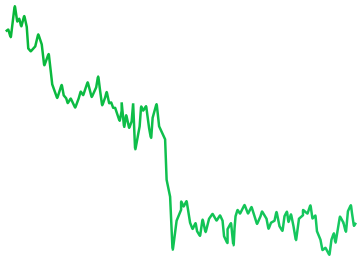

 LIVE1D1W1M1YALL
 Share
 Total Value£233,991.08
 +7.35%

 InsightsTransactionsActivityActivity

- Apr29Earnings Call予定Q1 2026 earnings call at 2:00 PM PT / 5:00 PM ET
- Apr09Analyst UpgradeRecentUpgraded to Buy by Goldman Sachs, PT $220
- Apr01Ex-dividend DateRecentEx-dividend date for $0.24 per share payout
 +6.43%+6.43%
 +4.1%+3.5%
 -0.73 pp




 -1.6%
 ‘21
 ‘22
 ‘23
 ‘24‘25
 ‘26
 ‘27‘28

 +2.1%+0.01%
 -1.3%+0.02-0.12%+0.9 pp
- Sankala Group Advisory LLC0.03%109.34T
- Andrea Jung0.02%984.62K
- Ronald D Sugar<0.01%1.84K
- Timothy D Cook<0.01%948
- Vanguard Global<0.01%105
- Sankala Group Advisory LLC03/31/2026Purchase+381.74K+1.14%
- Andrea Jung03/31/2026Purchase+1.84K+21.29%
- Ronald D Sugar03/31/2026Sell-999+10.14%
- Timothy D Cook03/31/2026Exit-50+0.1%
- Vanguard Global03/31/2026Exit-105+0.1%
 Tesla£441.00+3.6%
 Amazon£0.038391+3,913.09%


 Interactive B...£20.31
 -2.73%
- Interactive B...£20.31-2.73%

 Every asset. One app.
On-chain trading powered by StrikeX Technologies
Create new account Import existing accountBy continuing, you agree to our Terms and Conditions

 Create a passkey
A stronger alternative to seed phrases, secured by your device’s hardware.
Account 1 Create PasskeyA cloud-synced passkey is required for recovery if this device is lost.
Learn more.
Face IDから、最初の
株式トークンへ。


Anything to anything. In one tap.


Buy stock tokens straight from crypto like SOL, ETH or USDC. No selling first.*
A live quote shows the rate, slippage and every fee, refreshing while you decide.
Tap Buy and your session key signs the trade, within the limit you set.
 Buy NVDAX

 USDC • $8.40
 ETH • $15.10
 SOL • $26.32


 0%
Min25%50%75%Max
- Pricing
- 1 SOL = 0.451586 NVDAX
- Est. Time
- ~5–10 sec
- Slippage
- Auto (1%)
- Min. Received
- 0.098875 NVDAX
- Fees
- 0.002386 SOL • $0.23
Quote refreshes in 0:20
Know the market. Find your next move.
See what’s shaping the markets.


Smart Analysis sums up today’s markets, and Market Sentiment reads fear or greed.
Follow the S&P 500, Nasdaq, Bitcoin and Ethereum side by side.
Upcoming earnings, trend signals and insider trades for the companies behind each stock token.*
 TradeBuy & Sell
 InsightsOverview
 NewsTop headlines
株式 climb, but investors remain cautious.
強気
暗号資産 rallies as Bitcoin holds firm.
強気

 S&P 500$772.44
 +0.93%

 NASDAQ$717.04+1.11%
 Russell 2...$95,256.94+3.6%

 Bitcoin$95,256.94+0.93%
 Ethereum$3,940.14+1.11%
 DOW Jon...$95,256.94+3.6%
 NVIDIA$213.47+0.41%DOW Jon...$95,256.94+3.6%Russell 2...$95,256.94+3.6%Ethereum$3,940.14+1.11%Bitcoin$95,256.94+0.93%S&P 500$772.44+0.93%
 Crypto Market Cap
 +10.39%$2.71T
 BTC Dominance
 -2.73%59.13%
 24h Stablecoin Flow+$9.77M
- 7d Stablecoin Flow-$67.4M
- 10月20NFLX 決算予定Q1 2026 earnings call at 2:00 PM PT / 5:00 PM ET
- Sep12TSLA 決算予定Expected report date (based on prior filings)
- Aug01MSFT Earnings予定Expected report date (based on prior filings)
- Jul30META Earnings予定Expected report date (based on prior filings)
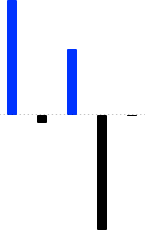


- Mark A Stevens03/31/2026Buy+433.98K+$1,284.01
- Mark A Stevens03/31/2026Sell-100K+$224.07
- Mark A Stevens03/31/2026Sell-1.25K-$10.94
- Jennifer Newstead03/31/2026Buy+2.39M+$103,058.90
- Jennifer Newstead03/31/2026Buy+52+$103,058.90


 +3.6%
 ローンチパッド
+3.6%
 株式
+3.6%
 ETF
 -2.73%
 Commodities
+3.6%
 Pre-IPO
+3.6%
 StrikeX
 STRX$0.01913+3.60%

 Bitcoin BTC$75,865−0.76%
 Ethereum ETH$2,395−3.16%
 Tether USDT$1.00+0.01%
 Solana SOL$97.05−3.61%
 BNB BNB$612.40+0.92%
 Dogecoin DOGE$0.18+6.12%
 XRP XRP$2.18+1.84%
 Cardano ADA$0.71−1.20%
 Chainlink LINK$15.42+2.06%Solana SOL$97.05−3.61%StrikeX STRX$0.01913+3.60%USD Coin USDC$1.00+0.01%
 Apple AAPL$331.44−0.17%
 Tesla TSLA$357.13+0.36%Nvidia NVDA$213.47+0.41%
 Netflix NFLX$1,184+0.22%
 Meta META$612.20+1.12%
 AMD AMD$164.10+2.84%
 Google GOOGL$176.40+0.54%
 Coinbase COIN$248.10+0.88%
 Palantir PLTR$41.20+2.11%
 Uber UBER$86.40+0.92%AMD AMD$164.10+2.84%Palantir PLTR$41.20+2.11%Meta META$612.20+1.12%Uber UBER$86.40+0.92%Coinbase COIN$248.10+0.88%Google GOOGL$176.40+0.54%Nvidia NVDA$213.47+0.41%Tesla TSLA$357.13+0.36%Netflix NFLX$1,184+0.22%
 Visa V$352.80+0.18%Apple AAPL$331.44−0.17%Tesla TSLA$357.13+0.36%Nvidia NVDA$213.47+0.41%Netflix NFLX$1,184+0.22%Palantir PLTR$41.20+2.11%Meta META$612.20+1.12%AMD AMD$164.10+2.84%Google GOOGL$176.40+0.54%Uber UBER$86.40+0.92%Coinbase COIN$248.10+0.88%Tesla TSLA$357.13+0.36%Nvidia NVDA$213.47+0.41%Apple AAPL$331.44−0.17%Meta META$612.20+1.12%Google GOOGL$176.40+0.54%Netflix NFLX$1,184+0.22%Palantir PLTR$41.20+2.11%AMD AMD$164.10+2.84%Uber UBER$86.40+0.92%Coinbase COIN$248.10+0.88%
Search & trade any Crypto, stock, ETF.
Find crypto, stocks, ETFs and new launches in one search, or browse by category.
See what’s popular, the day’s biggest movers and the latest listings.
よくある
ご質問
ほかにご質問はありますか?
セットアップ、入金、スワップ、手数料、復元について、ヘルプセンターで詳しくご案内しています。

いいえ。TradeStrikeは、Face ID、Touch ID、またはデバイスの生体認証で保護されたパスキーを使用します。覚えておく必要のあるパスワードや、ウェブサイトに入力するパスワードはありません。
いいえ。日常のアクセスには、デバイスのハードウェア内で作成されたパスキーを使用するため、登録時に何かを書き留める必要はありません。ただし Bitcoin、Tron、XRP は例外で、デバイスに保存されたリカバリーフレーズを使用します。このフレーズはバックアップとしてエクスポートできます。すでにフレーズをお持ちの場合は、既存のウォレットをインポートすることもできます。
パスキーは、AppleデバイスではiCloudキーチェーン、AndroidではGoogleパスワードマネージャーでバックアップされている必要があります。これにより、スマートフォンを紛失したり買い替えたりした場合でもアクセスが守られます。同期が無効になっている場合は、デバイスの設定で有効にしてから、もう一度アカウントを作成してください。
パスキーの同期に使用したものと同じAppleアカウントまたはGoogleアカウントで新しいスマートフォンにサインインし、TradeStrikeをインストールして、保存済みのデバイスのパスキーを選択してください。既存のアカウントを復元する場合は、別のパスキーを作成しないでください。保存済みのパスキーが表示されない場合は、iCloudキーチェーンまたはGoogleパスワードマネージャーの同期がオンになっているかご確認ください。
バックアップウォレットを連携していれば、アプリがなくても資金にアクセスできます。「ウォレット復元」を開いてそのウォレットを接続すると、オンチェーンでアカウントを見つけ、資金をそのウォレットへ送ります。シードフレーズを求められることはなく、資金は接続したウォレットにしか送れません。Bitcoin、Tron、XRPは、エクスポートしたリカバリーフレーズを使います。
「キャッシュ」から利用可能な決済プロバイダーを通じて購入するか、「受取」を選択して別のウォレットや取引所から暗号資産を送金してください。暗号資産を受け取る際は、まず資産とネットワークを選択し、アドレスをコピーするかQRコードをスキャンしてください。送信者が選択するネットワークは、TradeStrikeに表示されているネットワークと完全に一致している必要があります。
カードや銀行による支払い方法は、お住まいの地域、選択した通貨、各決済プロバイダーの対応範囲によって異なります。また、メンテナンス中やサービスのパフォーマンス低下時には、プロバイダーが一時的に利用できない場合があります。キャッシュサービスが利用できない場合でも、対応する暗号資産をウォレットに直接受け取ることはできます。
トークン化株式とは、実在する企業に連動するオンチェーンのトークンで、Robinhood、Backed xStocks、Ondo、Coinbase、PreStocksなどが発行しています。ウォレット内で暗号資産と並んで保有されます。USDCで5ドルから購入でき、Face IDで署名し、取引時間や株式に対するプレミアム・ディスカウントも確認できます。
パスキーで制限付きのスワップセッションを承認すると、対応するスワップをワンタップで完了できます。「設定」→「セキュリティとプライバシー」→「セッション制限」を開き、スワップ1回あたりの上限額とセッションの有効期間を選択してください。上限を超えるスワップや、セッションの期限切れ後に行うスワップでは、再度パスキーの確認が求められます。
スワップとその手数料の両方に十分な残高があるかご確認ください。資産の流動性が限られている場合、利用可能なルートがない場合、または市場がスリッページ設定を超えて変動した場合にも、見積もりが失敗することがあります。金額を減らし、「手数料の設定」とスリッページを見直してから、タップして再試行してください。
手数料は取引を承認する前に表示されます。「手数料の設定」を開くと、対応している場合はSTRXまたはそのネットワークのネイティブトークンを選択できます。パスキーのスマートアカウントを作成せずに従来型のアカウントをインポートした場合、ネットワーク手数料はそのネットワークのネイティブトークンで支払う必要があります。
ブロックチェーン取引は、利用可能になる前にネットワークによる承認が必要です。Bitcoinの入金には複数回の承認が必要な場合があり、クロスチェーンスワップは複数のネットワークが関わるため、より時間がかかります。「アクティビティ」を開いてステータスを確認するか、ブロックエクスプローラーで取引を表示し、インターネットに接続した状態で引き下げて更新してください。
送金が反映されない可能性があり、ブロックチェーン取引は取り消すことができません。送金前に必ず、送信側と受取側の両方で資産とネットワークを一致させてください。Ethereum系のネットワークは同じアドレスを共有しますが、Solana、Bitcoin、Tron、XRPはそれぞれ異なるアドレスを使用し、互換性はありません。
別のウォレットに暗号資産を送金するには「送信」を選択します。パスキーで承認する前に、確認画面で受取人のアドレス、ネットワーク、手数料をご確認ください。現金で出金するには「キャッシュ」を開き、お住まいの地域でオフランプ・プロバイダーが利用可能な場合は「売却」を選択してください。
「設定」→「サポート」を開いてください。「システムステータス」では対応ネットワークが利用可能か、パフォーマンスが低下しているか、メンテナンス中かを確認でき、「ヘルプセンター」では追加のガイドを参照できます。アカウントや復元に関するサポートは、support@tradestrike.io までお問い合わせください。TradeStrikeのサポートが、予期しないパスキーのリクエストの承認や、アカウントの非公開の認証情報の共有を求めることは決してありません。
TradeStrikeをダウンロード
トークン化資産のためのアプリ。