

निवेश, ट्रेडिंग, स्टॉक्स और बाज़ार। अब ऑन-चेन, नए रूप में
टोकनाइज़्ड एसेट के लिए ऐप।
टोकनाइज़्ड बाज़ारों के लिए बनाया गया।



 Tesla
TSLAX


 +£11.88+3.60%आज


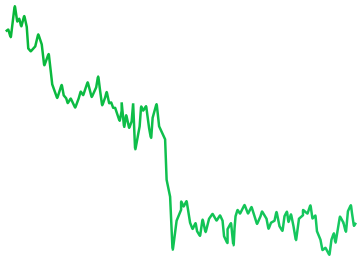

 LIVE1D1W1M1YALL
 Share
 Total Value£233,991.08
 +7.35%

 InsightsTransactionsActivityActivity

- Apr29Earnings CallआगामीQ1 2026 earnings call at 2:00 PM PT / 5:00 PM ET
- Apr09Analyst UpgradeRecentUpgraded to Buy by Goldman Sachs, PT $220
- Apr01Ex-dividend DateRecentEx-dividend date for $0.24 per share payout
 +6.43%+6.43%
 +4.1%+3.5%
 -0.73 pp




 -1.6%
 ‘21
 ‘22
 ‘23
 ‘24‘25
 ‘26
 ‘27‘28

 +2.1%+0.01%
 -1.3%+0.02-0.12%+0.9 pp
- Sankala Group Advisory LLC0.03%109.34T
- Andrea Jung0.02%984.62K
- Ronald D Sugar<0.01%1.84K
- Timothy D Cook<0.01%948
- Vanguard Global<0.01%105
- Sankala Group Advisory LLC03/31/2026Purchase+381.74K+1.14%
- Andrea Jung03/31/2026Purchase+1.84K+21.29%
- Ronald D Sugar03/31/2026Sell-999+10.14%
- Timothy D Cook03/31/2026Exit-50+0.1%
- Vanguard Global03/31/2026Exit-105+0.1%
 Tesla£441.00+3.6%
 Amazon£0.038391+3,913.09%


 Interactive B...£20.31
 -2.73%
- Interactive B...£20.31-2.73%

 Every asset. One app.
On-chain trading powered by StrikeX Technologies
Create new account Import existing accountBy continuing, you agree to our Terms and Conditions

 Create a passkey
A stronger alternative to seed phrases, secured by your device’s hardware.
Account 1 Create PasskeyA cloud-synced passkey is required for recovery if this device is lost.
Learn more.
Face ID से आपके पहले
स्टॉक टोकन तक।


Anything to anything. In one tap.


Buy stock tokens straight from crypto like SOL, ETH or USDC. No selling first.*
A live quote shows the rate, slippage and every fee, refreshing while you decide.
Tap Buy and your session key signs the trade, within the limit you set.
 Buy NVDAX

 USDC • $8.40
 ETH • $15.10
 SOL • $26.32


 0%
Min25%50%75%Max
- Pricing
- 1 SOL = 0.451586 NVDAX
- Est. Time
- ~5–10 sec
- Slippage
- Auto (1%)
- Min. Received
- 0.098875 NVDAX
- Fees
- 0.002386 SOL • $0.23
Quote refreshes in 0:20
Know the market. Find your next move.
See what’s shaping the markets.


Smart Analysis sums up today’s markets, and Market Sentiment reads fear or greed.
Follow the S&P 500, Nasdaq, Bitcoin and Ethereum side by side.
Upcoming earnings, trend signals and insider trades for the companies behind each stock token.*
 TradeBuy & Sell
 InsightsOverview
 NewsTop headlines
स्टॉक्स climb, but investors remain cautious.
तेज़ी
क्रिप्टो rallies as Bitcoin holds firm.
तेज़ी

 S&P 500$772.44
 +0.93%

 NASDAQ$717.04+1.11%
 Russell 2...$95,256.94+3.6%

 Bitcoin$95,256.94+0.93%
 Ethereum$3,940.14+1.11%
 DOW Jon...$95,256.94+3.6%
 NVIDIA$213.47+0.41%DOW Jon...$95,256.94+3.6%Russell 2...$95,256.94+3.6%Ethereum$3,940.14+1.11%Bitcoin$95,256.94+0.93%S&P 500$772.44+0.93%
 Crypto Market Cap
 +10.39%$2.71T
 BTC Dominance
 -2.73%59.13%
 24h Stablecoin Flow+$9.77M
- 7d Stablecoin Flow-$67.4M
- अक्टू20NFLX अर्निंग्सआगामीQ1 2026 earnings call at 2:00 PM PT / 5:00 PM ET
- Sep12TSLA अर्निंग्सआगामीExpected report date (based on prior filings)
- Aug01MSFT EarningsआगामीExpected report date (based on prior filings)
- Jul30META EarningsआगामीExpected report date (based on prior filings)
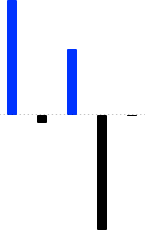


- Mark A Stevens03/31/2026Buy+433.98K+$1,284.01
- Mark A Stevens03/31/2026Sell-100K+$224.07
- Mark A Stevens03/31/2026Sell-1.25K-$10.94
- Jennifer Newstead03/31/2026Buy+2.39M+$103,058.90
- Jennifer Newstead03/31/2026Buy+52+$103,058.90


 +3.6%
 लॉन्चपैड
+3.6%
 स्टॉक्स
+3.6%
 ETF
 -2.73%
 Commodities
+3.6%
 Pre-IPO
+3.6%
 StrikeX
 STRX$0.01913+3.60%

 Bitcoin BTC$75,865−0.76%
 Ethereum ETH$2,395−3.16%
 Tether USDT$1.00+0.01%
 Solana SOL$97.05−3.61%
 BNB BNB$612.40+0.92%
 Dogecoin DOGE$0.18+6.12%
 XRP XRP$2.18+1.84%
 Cardano ADA$0.71−1.20%
 Chainlink LINK$15.42+2.06%Solana SOL$97.05−3.61%StrikeX STRX$0.01913+3.60%USD Coin USDC$1.00+0.01%
 Apple AAPL$331.44−0.17%
 Tesla TSLA$357.13+0.36%Nvidia NVDA$213.47+0.41%
 Netflix NFLX$1,184+0.22%
 Meta META$612.20+1.12%
 AMD AMD$164.10+2.84%
 Google GOOGL$176.40+0.54%
 Coinbase COIN$248.10+0.88%
 Palantir PLTR$41.20+2.11%
 Uber UBER$86.40+0.92%AMD AMD$164.10+2.84%Palantir PLTR$41.20+2.11%Meta META$612.20+1.12%Uber UBER$86.40+0.92%Coinbase COIN$248.10+0.88%Google GOOGL$176.40+0.54%Nvidia NVDA$213.47+0.41%Tesla TSLA$357.13+0.36%Netflix NFLX$1,184+0.22%
 Visa V$352.80+0.18%Apple AAPL$331.44−0.17%Tesla TSLA$357.13+0.36%Nvidia NVDA$213.47+0.41%Netflix NFLX$1,184+0.22%Palantir PLTR$41.20+2.11%Meta META$612.20+1.12%AMD AMD$164.10+2.84%Google GOOGL$176.40+0.54%Uber UBER$86.40+0.92%Coinbase COIN$248.10+0.88%Tesla TSLA$357.13+0.36%Nvidia NVDA$213.47+0.41%Apple AAPL$331.44−0.17%Meta META$612.20+1.12%Google GOOGL$176.40+0.54%Netflix NFLX$1,184+0.22%Palantir PLTR$41.20+2.11%AMD AMD$164.10+2.84%Uber UBER$86.40+0.92%Coinbase COIN$248.10+0.88%
Search & trade any Crypto, stock, ETF.
Find crypto, stocks, ETFs and new launches in one search, or browse by category.
See what’s popular, the day’s biggest movers and the latest listings.
अक्सर पूछे जाने वाले
प्रश्न
और सवाल हैं?
सेटअप, डिपॉज़िट, स्वैप, फ़ीस और रिकवरी, सबके विस्तृत जवाब हमारे सहायता केंद्र में।

नहीं। TradeStrike, Face ID, Touch ID या आपके डिवाइस के बायोमेट्रिक्स से सुरक्षित पासकी का उपयोग करता है। न कोई पासवर्ड याद रखना है, न किसी वेबसाइट पर टाइप करना है।
नहीं। रोज़मर्रा की एक्सेस आपकी पासकी से होती है, जो डिवाइस के हार्डवेयर में बनती है, इसलिए साइन अप करते समय कुछ भी लिखकर रखने की ज़रूरत नहीं होती। Bitcoin, Tron और XRP इसका अपवाद हैं: ये आपके डिवाइस पर रखे एक रिकवरी फ़्रेज़ का उपयोग करते हैं, जिसे आप बैकअप के रूप में एक्सपोर्ट कर सकते हैं। अगर आपके पास पहले से कोई फ़्रेज़ है, तो आप मौजूदा वॉलेट अब भी इम्पोर्ट कर सकते हैं।
आपकी पासकी का बैकअप Apple डिवाइस पर iCloud Keychain या Android पर Google Password Manager के ज़रिए होना ज़रूरी है। इससे फ़ोन खो जाने या बदलने पर भी आपकी एक्सेस सुरक्षित रहती है। अगर सिंक बंद है, तो उसे अपने डिवाइस की सेटिंग्स में चालू करें और फिर से अकाउंट बनाने का प्रयास करें।
नए फ़ोन में उसी Apple या Google अकाउंट से साइन इन करें जिसका उपयोग पासकी सिंक के लिए हुआ था, TradeStrike इंस्टॉल करें और अपने डिवाइस में सहेजी गई पासकी चुनें। किसी मौजूदा अकाउंट को रिस्टोर करते समय नई पासकी न बनाएँ। अगर सहेजी गई पासकी का विकल्प नहीं दिखता, तो पुष्टि करें कि iCloud Keychain या Google Password Manager सिंक चालू है।
अगर आपने बैकअप वॉलेट लिंक किया है, तो आप ऐप के बिना भी अपने फ़ंड तक पहुँच सकते हैं। वॉलेट रिकवरी खोलें, उस वॉलेट को कनेक्ट करें, और यह ऑन-चेन आपका अकाउंट ढूँढकर आपके फ़ंड उसमें भेज देगा। यह कभी सीड फ़्रेज़ नहीं माँगता, और फ़ंड केवल उसी वॉलेट में जा सकते हैं जिसे आप कनेक्ट करते हैं। Bitcoin, Tron और XRP के लिए आपके द्वारा एक्सपोर्ट किया गया रिकवरी फ़्रेज़ इस्तेमाल होता है।
किसी उपलब्ध भुगतान प्रदाता के ज़रिए खरीदने के लिए ‘कैश’ का उपयोग करें, या किसी दूसरे वॉलेट या एक्सचेंज से क्रिप्टो ट्रांसफ़र करने के लिए ‘प्राप्त करें’ चुनें। क्रिप्टो प्राप्त करते समय पहले एसेट और नेटवर्क चुनें, फिर एड्रेस कॉपी करें या उसका QR कोड स्कैन करें। भेजने वाले द्वारा चुना गया नेटवर्क, TradeStrike में दिखाए गए नेटवर्क से बिल्कुल मेल खाना चाहिए।
कार्ड और बैंक भुगतान विकल्प आपके क्षेत्र, चुनी गई मुद्रा और हर भुगतान प्रदाता की कवरेज पर निर्भर करते हैं। रखरखाव के दौरान या सेवा कमज़ोर होने पर कोई प्रदाता अस्थायी रूप से अनुपलब्ध भी हो सकता है। कैश सेवाएँ उपलब्ध न होने पर भी आप समर्थित क्रिप्टो सीधे अपने वॉलेट में प्राप्त कर सकते हैं।
टोकनाइज़्ड स्टॉक्स ऑन-चेन टोकन हैं जो किसी असली कंपनी को ट्रैक करते हैं, और इन्हें Robinhood, Backed xStocks, Ondo, Coinbase और PreStocks जैसे जारीकर्ता जारी करते हैं। ये आपके वॉलेट में क्रिप्टो के साथ रहते हैं। आप इन्हें पाँच डॉलर से USDC में खरीदते हैं, Face ID से साइन करते हैं, और ट्रेडिंग समय के साथ-साथ शेयर की तुलना में कोई भी प्रीमियम या डिस्काउंट देखते हैं।
आपकी पासकी एक सीमित स्वैप सत्र को अधिकृत कर सकती है, ताकि समर्थित स्वैप एक टैप में पूरे हो जाएँ। प्रति स्वैप अधिकतम मूल्य और सत्र की अवधि चुनने के लिए Settings → सुरक्षा और गोपनीयता → सत्र सीमाएँ खोलें। आपकी सीमा से ऊपर का स्वैप, या सत्र समाप्त होने के बाद किया गया स्वैप, फिर से आपकी पासकी माँगेगा।
जाँचें कि आपके पास स्वैप और उसके शुल्क, दोनों के लिए पर्याप्त बैलेंस है। किसी एसेट की लिक्विडिटी सीमित होने, कोई रूट उपलब्ध न होने या मार्केट के आपकी स्लिपेज सेटिंग से अधिक बदल जाने पर भी कोट विफल हो सकता है। राशि कम करें, शुल्क प्राथमिकता और स्लिपेज की समीक्षा करें, फिर पुनः प्रयास के लिए टैप करें।
किसी ट्रांज़ैक्शन को स्वीकृत करने से पहले शुल्क दिखाया जाता है। जहाँ समर्थित हो, STRX या नेटवर्क का नेटिव टोकन चुनने के लिए शुल्क प्राथमिकता खोलें। अगर आपने पासकी स्मार्ट अकाउंट बनाने के बजाय कोई लेगेसी अकाउंट इम्पोर्ट किया है, तो नेटवर्क शुल्क उसी नेटवर्क के नेटिव टोकन में चुकाना होगा।
ब्लॉकचेन ट्रांज़ैक्शन उपलब्ध होने से पहले उनकी नेटवर्क पुष्टि ज़रूरी होती है। Bitcoin जमा के लिए कई पुष्टियाँ लग सकती हैं, और क्रॉस-चेन स्वैप में अधिक समय लगता है क्योंकि इनमें एक से ज़्यादा नेटवर्क शामिल होते हैं। स्थिति जाँचने या Block Explorer पर ट्रांज़ैक्शन देखने के लिए गतिविधि खोलें, फिर इंटरनेट से कनेक्ट रहते हुए रिफ़्रेश करने के लिए नीचे खींचें।
ट्रांसफ़र शायद दिखाई न दे, और ब्लॉकचेन ट्रांज़ैक्शन वापस नहीं किए जा सकते। भेजने से पहले हमेशा दोनों तरफ़ एसेट और नेटवर्क का मिलान करें। Ethereum-परिवार के नेटवर्क एक ही एड्रेस साझा करते हैं, लेकिन Solana, Bitcoin, Tron और XRP अलग-अलग एड्रेस का उपयोग करते हैं और एक-दूसरे की जगह इस्तेमाल नहीं किए जा सकते।
किसी दूसरे वॉलेट में क्रिप्टो ट्रांसफ़र करने के लिए ‘भेजें’ चुनें। अपनी पासकी से स्वीकृत करने से पहले समीक्षा स्क्रीन पर प्राप्तकर्ता का एड्रेस, नेटवर्क और शुल्क की पुष्टि करें। कैश में निकालने के लिए ‘कैश’ खोलें और ‘बेचें’ चुनें, जहाँ आपके क्षेत्र में कोई ऑफ़-रैंप प्रदाता उपलब्ध हो।
Settings → सहायता खोलें। सिस्टम स्थिति दिखाती है कि कोई समर्थित नेटवर्क उपलब्ध है, कमज़ोर है या रखरखाव में है, और सहायता केंद्र में अतिरिक्त मार्गदर्शन मिलता है। अकाउंट या रिकवरी से जुड़ी मदद के लिए support@tradestrike.io पर संपर्क करें। TradeStrike सपोर्ट आपसे कभी भी किसी अप्रत्याशित पासकी अनुरोध को स्वीकृत करने या अकाउंट के निजी क्रेडेंशियल साझा करने के लिए नहीं कहेगा।
TradeStrike डाउनलोड करें
टोकनाइज़्ड एसेट के लिए ऐप।