

Inversión, trading, acciones y mercados. Desde cero, en cadena
La app para activos tokenizados.
Creada para los mercados tokenizados.



 Tesla
TSLAX


 +£11.88+3.60%Hoy


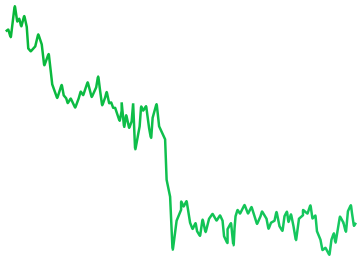

 LIVE1D1W1M1YALL
 Share
 Total Value£233,991.08
 +7.35%

 InsightsTransactionsActivityActivity

- Apr29Earnings CallPróximosQ1 2026 earnings call at 2:00 PM PT / 5:00 PM ET
- Apr09Analyst UpgradeRecentUpgraded to Buy by Goldman Sachs, PT $220
- Apr01Ex-dividend DateRecentEx-dividend date for $0.24 per share payout
 +6.43%+6.43%
 +4.1%+3.5%
 -0.73 pp




 -1.6%
 ‘21
 ‘22
 ‘23
 ‘24‘25
 ‘26
 ‘27‘28

 +2.1%+0.01%
 -1.3%+0.02-0.12%+0.9 pp
- Sankala Group Advisory LLC0.03%109.34T
- Andrea Jung0.02%984.62K
- Ronald D Sugar<0.01%1.84K
- Timothy D Cook<0.01%948
- Vanguard Global<0.01%105
- Sankala Group Advisory LLC03/31/2026Purchase+381.74K+1.14%
- Andrea Jung03/31/2026Purchase+1.84K+21.29%
- Ronald D Sugar03/31/2026Sell-999+10.14%
- Timothy D Cook03/31/2026Exit-50+0.1%
- Vanguard Global03/31/2026Exit-105+0.1%
 Tesla£441.00+3.6%
 Amazon£0.038391+3,913.09%


 Interactive B...£20.31
 -2.73%
- Interactive B...£20.31-2.73%

 Every asset. One app.
On-chain trading powered by StrikeX Technologies
Create new account Import existing accountBy continuing, you agree to our Terms and Conditions

 Create a passkey
A stronger alternative to seed phrases, secured by your device’s hardware.
Account 1 Create PasskeyA cloud-synced passkey is required for recovery if this device is lost.
Learn more.
De Face ID a tu primer
token de acción.


Anything to anything. In one tap.


Buy stock tokens straight from crypto like SOL, ETH or USDC. No selling first.*
A live quote shows the rate, slippage and every fee, refreshing while you decide.
Tap Buy and your session key signs the trade, within the limit you set.
 Buy NVDAX

 USDC • $8.40
 ETH • $15.10
 SOL • $26.32


 0%
Min25%50%75%Max
- Pricing
- 1 SOL = 0.451586 NVDAX
- Est. Time
- ~5–10 sec
- Slippage
- Auto (1%)
- Min. Received
- 0.098875 NVDAX
- Fees
- 0.002386 SOL • $0.23
Quote refreshes in 0:20
Know the market. Find your next move.
See what’s shaping the markets.


Smart Analysis sums up today’s markets, and Market Sentiment reads fear or greed.
Follow the S&P 500, Nasdaq, Bitcoin and Ethereum side by side.
Upcoming earnings, trend signals and insider trades for the companies behind each stock token.*
 TradeBuy & Sell
 InsightsOverview
 NewsTop headlines
Acciones climb, but investors remain cautious.
Alcista
Cripto rallies as Bitcoin holds firm.
Alcista

 S&P 500$772.44
 +0.93%

 NASDAQ$717.04+1.11%
 Russell 2...$95,256.94+3.6%

 Bitcoin$95,256.94+0.93%
 Ethereum$3,940.14+1.11%
 DOW Jon...$95,256.94+3.6%
 NVIDIA$213.47+0.41%DOW Jon...$95,256.94+3.6%Russell 2...$95,256.94+3.6%Ethereum$3,940.14+1.11%Bitcoin$95,256.94+0.93%S&P 500$772.44+0.93%
 Crypto Market Cap
 +10.39%$2.71T
 BTC Dominance
 -2.73%59.13%
 24h Stablecoin Flow+$9.77M
- 7d Stablecoin Flow-$67.4M
- oct20Resultados de NFLXPróximosQ1 2026 earnings call at 2:00 PM PT / 5:00 PM ET
- Sep12Resultados de TSLAPróximosExpected report date (based on prior filings)
- Aug01MSFT EarningsPróximosExpected report date (based on prior filings)
- Jul30META EarningsPróximosExpected report date (based on prior filings)
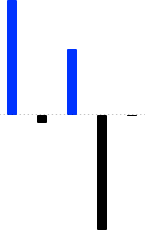


- Mark A Stevens03/31/2026Buy+433.98K+$1,284.01
- Mark A Stevens03/31/2026Sell-100K+$224.07
- Mark A Stevens03/31/2026Sell-1.25K-$10.94
- Jennifer Newstead03/31/2026Buy+2.39M+$103,058.90
- Jennifer Newstead03/31/2026Buy+52+$103,058.90


 +3.6%
 Launchpad
+3.6%
 Acciones
+3.6%
 ETF
 -2.73%
 Commodities
+3.6%
 Pre-IPO
+3.6%
 StrikeX
 STRX$0.01913+3.60%

 Bitcoin BTC$75,865−0.76%
 Ethereum ETH$2,395−3.16%
 Tether USDT$1.00+0.01%
 Solana SOL$97.05−3.61%
 BNB BNB$612.40+0.92%
 Dogecoin DOGE$0.18+6.12%
 XRP XRP$2.18+1.84%
 Cardano ADA$0.71−1.20%
 Chainlink LINK$15.42+2.06%Solana SOL$97.05−3.61%StrikeX STRX$0.01913+3.60%USD Coin USDC$1.00+0.01%
 Apple AAPL$331.44−0.17%
 Tesla TSLA$357.13+0.36%Nvidia NVDA$213.47+0.41%
 Netflix NFLX$1,184+0.22%
 Meta META$612.20+1.12%
 AMD AMD$164.10+2.84%
 Google GOOGL$176.40+0.54%
 Coinbase COIN$248.10+0.88%
 Palantir PLTR$41.20+2.11%
 Uber UBER$86.40+0.92%AMD AMD$164.10+2.84%Palantir PLTR$41.20+2.11%Meta META$612.20+1.12%Uber UBER$86.40+0.92%Coinbase COIN$248.10+0.88%Google GOOGL$176.40+0.54%Nvidia NVDA$213.47+0.41%Tesla TSLA$357.13+0.36%Netflix NFLX$1,184+0.22%
 Visa V$352.80+0.18%Apple AAPL$331.44−0.17%Tesla TSLA$357.13+0.36%Nvidia NVDA$213.47+0.41%Netflix NFLX$1,184+0.22%Palantir PLTR$41.20+2.11%Meta META$612.20+1.12%AMD AMD$164.10+2.84%Google GOOGL$176.40+0.54%Uber UBER$86.40+0.92%Coinbase COIN$248.10+0.88%Tesla TSLA$357.13+0.36%Nvidia NVDA$213.47+0.41%Apple AAPL$331.44−0.17%Meta META$612.20+1.12%Google GOOGL$176.40+0.54%Netflix NFLX$1,184+0.22%Palantir PLTR$41.20+2.11%AMD AMD$164.10+2.84%Uber UBER$86.40+0.92%Coinbase COIN$248.10+0.88%
Search & trade any Crypto, stock, ETF.
Find crypto, stocks, ETFs and new launches in one search, or browse by category.
See what’s popular, the day’s biggest movers and the latest listings.
Preguntas
frecuentes
¿Tienes más preguntas?
Configuración, depósitos, intercambios, comisiones y recuperación, respondidos en detalle en nuestro centro de ayuda.

No. TradeStrike usa una passkey protegida por Face ID, Touch ID o la biometría de tu dispositivo. No hay ninguna contraseña que recordar ni que escribir en un sitio web.
No. El acceso diario se realiza con tu passkey, creada en el hardware del dispositivo, así que no tienes que anotar nada al registrarte. Bitcoin, Tron y XRP son la excepción: usan una frase de recuperación guardada en tu dispositivo, que puedes exportar como copia de seguridad. Si ya tienes una frase, puedes seguir importando billeteras existentes.
Tu passkey debe tener una copia de seguridad en el Llavero de iCloud en dispositivos Apple o en Google Password Manager en Android. Así se protege el acceso si pierdes o cambias de teléfono. Si la sincronización está desactivada, actívala en los ajustes de tu dispositivo y vuelve a intentar crear la cuenta.
Inicia sesión en el teléfono nuevo con la misma cuenta de Apple o Google que usas para sincronizar las passkeys, instala TradeStrike y elige la passkey guardada en tu dispositivo. No crees otra passkey si estás restaurando una cuenta existente. Si no aparece la passkey guardada, comprueba que la sincronización del Llavero de iCloud o de Google Password Manager está activada.
Si vinculaste una cartera de respaldo, puedes acceder a tus fondos sin la app. Abre Recuperación de cartera, conecta esa cartera y encontrará tu cuenta en la cadena y enviará tus fondos a ella. Nunca te pide una frase semilla y los fondos solo pueden ir a la cartera que conectes. Bitcoin, Tron y XRP usan la frase de recuperación que exportaste.
Usa Efectivo para comprar a través de un proveedor de pagos disponible, o elige Recibir para transferir cripto desde otra cartera o exchange. Al recibir cripto, selecciona primero el activo y la red, y después copia la dirección o escanea su código QR. La red que seleccione el remitente debe coincidir exactamente con la red que se muestra en TradeStrike.
Las opciones de pago con tarjeta y transferencia bancaria dependen de tu región, de la moneda seleccionada y de la cobertura de cada proveedor de pagos. Un proveedor también puede no estar disponible temporalmente por mantenimiento o por un servicio degradado. Aunque los servicios de efectivo no estén disponibles, puedes seguir recibiendo cripto compatibles directamente en tu cartera.
Las acciones tokenizadas son tokens en cadena que replican a una empresa real, emitidos por entidades como Robinhood, Backed xStocks, Ondo, Coinbase y PreStocks. Se guardan en tu cartera junto a tus cripto. Puedes comprarlas con USDC desde cinco dólares, firmar con Face ID y ver el horario de mercado, además de cualquier prima o descuento respecto a la acción.
Tu passkey puede autorizar una sesión de swap limitada para que los swaps compatibles se completen con un solo toque. Abre Ajustes → Seguridad y privacidad → Límites de sesión para elegir el valor máximo por swap y la duración de la sesión. Si un swap supera tu límite, o se intenta después de que expire la sesión, se te volverá a pedir tu passkey.
Comprueba que tienes saldo suficiente tanto para el swap como para sus comisiones. Una cotización también puede fallar cuando un activo tiene liquidez limitada, no hay ninguna ruta disponible o el mercado se mueve más allá de tu tolerancia de deslizamiento. Reduce el importe, revisa la Preferencia de comisiones y el deslizamiento, y toca para reintentar.
Las comisiones se muestran antes de que apruebes una transacción. Abre Preferencia de comisiones para elegir STRX o el token nativo de la red, donde sea compatible. Si importaste una cuenta heredada en lugar de crear una cuenta inteligente con passkey, las comisiones de red deben pagarse con el token nativo de esa red.
Las transacciones de blockchain necesitan la confirmación de la red antes de estar disponibles. Los depósitos de Bitcoin pueden requerir varias confirmaciones, y los swaps entre cadenas tardan más porque intervienen varias redes. Abre Actividad para consultar el estado o ver la transacción en un explorador de bloques y, después, desliza hacia abajo para actualizar mientras estés conectado a internet.
Es posible que la transferencia no aparezca, y las transacciones de blockchain no se pueden revertir. Antes de enviar, asegúrate siempre de que el activo y la red coinciden en ambos lados. Las redes de la familia Ethereum comparten dirección, pero Solana, Bitcoin, Tron y XRP usan direcciones distintas y no son intercambiables.
Elige Enviar para transferir cripto a otra cartera. Confirma la dirección del destinatario, la red y las comisiones en la pantalla de revisión antes de aprobar con tu passkey. Para retirar a efectivo, abre Efectivo y elige Vender si hay un proveedor de off-ramp disponible en tu región.
Abre Ajustes → Soporte. Estado del sistema muestra si una red compatible está disponible, degradada o en mantenimiento, y Centro de ayuda ofrece guías adicionales. Si necesitas ayuda con tu cuenta o con su recuperación, escribe a support@tradestrike.io. El soporte de TradeStrike nunca te pedirá que apruebes una solicitud inesperada de passkey ni que compartas las credenciales privadas de tu cuenta.
Descarga TradeStrike
La app para activos tokenizados.