

Investing, trading, stocks and markets. Rebuilt On-Chain
The App for tokenised assets.
Purpose-built for tokenised markets.



 Tesla
TSLAX


 +£11.88+3.60%Today


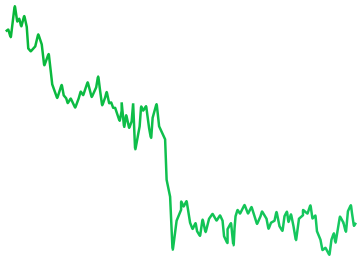

 LIVE1D1W1M1YALL
 Share
 Total Value£233,991.08
 +7.35%

 InsightsTransactionsActivityActivity

- Apr29Earnings CallUpcomingQ1 2026 earnings call at 2:00 PM PT / 5:00 PM ET
- Apr09Analyst UpgradeRecentUpgraded to Buy by Goldman Sachs, PT $220
- Apr01Ex-dividend DateRecentEx-dividend date for $0.24 per share payout
 +6.43%+6.43%
 +4.1%+3.5%
 -0.73 pp




 -1.6%
 ‘21
 ‘22
 ‘23
 ‘24‘25
 ‘26
 ‘27‘28

 +2.1%+0.01%
 -1.3%+0.02-0.12%+0.9 pp
- Sankala Group Advisory LLC0.03%109.34T
- Andrea Jung0.02%984.62K
- Ronald D Sugar<0.01%1.84K
- Timothy D Cook<0.01%948
- Vanguard Global<0.01%105
- Sankala Group Advisory LLC03/31/2026Purchase+381.74K+1.14%
- Andrea Jung03/31/2026Purchase+1.84K+21.29%
- Ronald D Sugar03/31/2026Sell-999+10.14%
- Timothy D Cook03/31/2026Exit-50+0.1%
- Vanguard Global03/31/2026Exit-105+0.1%
 Tesla£441.00+3.6%
 Amazon£0.038391+3,913.09%


 Interactive B...£20.31
 -2.73%
- Interactive B...£20.31-2.73%

 Every asset. One app.
On-chain trading powered by StrikeX Technologies
Create new account Import existing accountBy continuing, you agree to our Terms and Conditions

 Create a passkey
A stronger alternative to seed phrases, secured by your device’s hardware.
Account 1 Create PasskeyA cloud-synced passkey is required for recovery if this device is lost.
Learn more.
From Face ID to your
first stock token.


Anything to anything. In one tap.


Buy stock tokens straight from crypto like SOL, ETH or USDC. No selling first.*
A live quote shows the rate, slippage and every fee, refreshing while you decide.
Tap Buy and your session key signs the trade, within the limit you set.
 Buy NVDAX

 USDC • $8.40
 ETH • $15.10
 SOL • $26.32


 0%
Min25%50%75%Max
- Pricing
- 1 SOL = 0.451586 NVDAX
- Est. Time
- ~5–10 sec
- Slippage
- Auto (1%)
- Min. Received
- 0.098875 NVDAX
- Fees
- 0.002386 SOL • $0.23
Quote refreshes in 0:20
Know the market. Find your next move.
See what’s shaping the markets.


Smart Analysis sums up today’s markets, and Market Sentiment reads fear or greed.
Follow the S&P 500, Nasdaq, Bitcoin and Ethereum side by side.
Upcoming earnings, trend signals and insider trades for the companies behind each stock token.*
 TradeBuy & Sell
 InsightsOverview
 NewsTop headlines
Stocks climb, but investors remain cautious.
Bullish
Crypto rallies as Bitcoin holds firm.
Bullish

 S&P 500$772.44
 +0.93%

 NASDAQ$717.04+1.11%
 Russell 2...$95,256.94+3.6%

 Bitcoin$95,256.94+0.93%
 Ethereum$3,940.14+1.11%
 DOW Jon...$95,256.94+3.6%
 NVIDIA$213.47+0.41%DOW Jon...$95,256.94+3.6%Russell 2...$95,256.94+3.6%Ethereum$3,940.14+1.11%Bitcoin$95,256.94+0.93%S&P 500$772.44+0.93%
 Crypto Market Cap
 +10.39%$2.71T
 BTC Dominance
 -2.73%59.13%
 24h Stablecoin Flow+$9.77M
- 7d Stablecoin Flow-$67.4M
- Oct20NFLX EarningsUpcomingQ1 2026 earnings call at 2:00 PM PT / 5:00 PM ET
- Sep12TSLA EarningsUpcomingExpected report date (based on prior filings)
- Aug01MSFT EarningsUpcomingExpected report date (based on prior filings)
- Jul30META EarningsUpcomingExpected report date (based on prior filings)
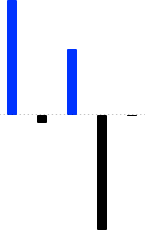


- Mark A Stevens03/31/2026Buy+433.98K+$1,284.01
- Mark A Stevens03/31/2026Sell-100K+$224.07
- Mark A Stevens03/31/2026Sell-1.25K-$10.94
- Jennifer Newstead03/31/2026Buy+2.39M+$103,058.90
- Jennifer Newstead03/31/2026Buy+52+$103,058.90


 +3.6%
 Launchpad
+3.6%
 Stocks
+3.6%
 ETFs
 -2.73%
 Commodities
+3.6%
 Pre-IPO
+3.6%
 StrikeX
 STRX$0.01913+3.60%

 Bitcoin BTC$75,865−0.76%
 Ethereum ETH$2,395−3.16%
 Tether USDT$1.00+0.01%
 Solana SOL$97.05−3.61%
 BNB BNB$612.40+0.92%
 Dogecoin DOGE$0.18+6.12%
 XRP XRP$2.18+1.84%
 Cardano ADA$0.71−1.20%
 Chainlink LINK$15.42+2.06%Solana SOL$97.05−3.61%StrikeX STRX$0.01913+3.60%USD Coin USDC$1.00+0.01%
 Apple AAPL$331.44−0.17%
 Tesla TSLA$357.13+0.36%Nvidia NVDA$213.47+0.41%
 Netflix NFLX$1,184+0.22%
 Meta META$612.20+1.12%
 AMD AMD$164.10+2.84%
 Google GOOGL$176.40+0.54%
 Coinbase COIN$248.10+0.88%
 Palantir PLTR$41.20+2.11%
 Uber UBER$86.40+0.92%AMD AMD$164.10+2.84%Palantir PLTR$41.20+2.11%Meta META$612.20+1.12%Uber UBER$86.40+0.92%Coinbase COIN$248.10+0.88%Google GOOGL$176.40+0.54%Nvidia NVDA$213.47+0.41%Tesla TSLA$357.13+0.36%Netflix NFLX$1,184+0.22%
 Visa V$352.80+0.18%Apple AAPL$331.44−0.17%Tesla TSLA$357.13+0.36%Nvidia NVDA$213.47+0.41%Netflix NFLX$1,184+0.22%Palantir PLTR$41.20+2.11%Meta META$612.20+1.12%AMD AMD$164.10+2.84%Google GOOGL$176.40+0.54%Uber UBER$86.40+0.92%Coinbase COIN$248.10+0.88%Tesla TSLA$357.13+0.36%Nvidia NVDA$213.47+0.41%Apple AAPL$331.44−0.17%Meta META$612.20+1.12%Google GOOGL$176.40+0.54%Netflix NFLX$1,184+0.22%Palantir PLTR$41.20+2.11%AMD AMD$164.10+2.84%Uber UBER$86.40+0.92%Coinbase COIN$248.10+0.88%
Search & trade any Crypto, stock, ETF.
Find crypto, stocks, ETFs and new launches in one search, or browse by category.
See what’s popular, the day’s biggest movers and the latest listings.
Frequently
Asked Questions
Still have questions?
Setup, deposits, swaps, fees and recovery, answered in full in our help centre.

No. TradeStrike uses a passkey protected by Face ID, Touch ID or your device biometrics. There is no password to remember or type into a website.
No. Day-to-day access is your passkey, created in the device hardware, so there is nothing to write down when you sign up. Bitcoin, Tron and XRP are the exception: they use a recovery phrase kept on your device, which you can export as a backup. Existing wallets can still be imported if you already have a phrase.
Your passkey must be backed up through iCloud Keychain on Apple devices or Google Password Manager on Android. This protects access if your phone is lost or replaced. If sync is disabled, enable it in your device settings and then try creating the account again.
Sign in to the new phone with the same Apple or Google account used for passkey sync, install TradeStrike and choose your saved device passkey. Do not create a different passkey if you are restoring an existing account. If the saved passkey is not offered, confirm that iCloud Keychain or Google Password Manager sync is on.
If you linked a backup wallet, you can still reach your funds without the app. Open Wallet Recovery, connect that wallet, and it finds your account on-chain and sends your funds to it. It never asks for a seed phrase, and funds can only go to the wallet you connect. Bitcoin, Tron and XRP use the recovery phrase you exported instead.
Use Cash to buy through an available payment provider, or choose Receive to transfer crypto from another wallet or exchange. When receiving crypto, select the asset and network first, then copy the address or scan its QR code. The network selected by the sender must exactly match the network shown in TradeStrike.
Card and bank payment options depend on your region, selected currency and each payment provider’s coverage. A provider may also be temporarily unavailable during maintenance or degraded service. You can still receive supported crypto directly into your wallet when cash services are unavailable.
Tokenised stocks are on-chain tokens that track a real company, issued by names such as Robinhood, Backed xStocks, Ondo, Coinbase and PreStocks. They sit in your wallet next to crypto. You buy them with USDC from five dollars, sign with Face ID, and see market hours plus any premium or discount to the share.
Your passkey can authorise a limited swap session so supported swaps complete in one tap. Open Settings → Security & Privacy → Session Limits to choose the maximum value per swap and how long the session lasts. A swap above your limit, or one attempted after the session expires, asks for your passkey again.
Check that you have enough balance for both the swap and its fees. A quote can also fail when an asset has limited liquidity, no available route or the market moves beyond your slippage setting. Reduce the amount, review Fee Preference and slippage, then tap to retry.
Fees are shown before you approve a transaction. Open Fee Preference to choose STRX or the network’s native token where supported. If you imported a legacy account instead of creating a passkey smart account, network fees must be paid with that network’s native token.
Blockchain transactions need network confirmation before they are available. Bitcoin deposits can require several confirmations, and cross-chain swaps take longer because more than one network is involved. Open Activity to check the status or view the transaction on a block explorer, then pull to refresh while connected to the internet.
The transfer may not appear and blockchain transactions cannot be reversed. Always match the asset and network on both sides before sending. Ethereum-family networks share an address, but Solana, Bitcoin, Tron and XRP use different addresses and are not interchangeable.
Choose Send to transfer crypto to another wallet. Confirm the recipient address, network and fees on the review screen before approving with your passkey. To withdraw to cash, open Cash and choose Sell where an off-ramp provider is available in your region.
Open Settings → Support. System Status shows whether a supported network is available, degraded or under maintenance, and Help Center opens additional guidance. For account or recovery help, contact support@tradestrike.io. TradeStrike support will never ask you to approve an unexpected passkey request or share private account credentials.
Download TradeStrike
The App for tokenised assets.